Why Is My Automatic Cat Feeder Jammed?
A jammed automatic cat feeder is usually blocked by kibble, a dirty outlet, or a stuck rotor. Unplug it, remove the food, clear loose pieces, and check the outlet and moving parts before testing it again.
On this page (7 sections)
- What should you do first when an automatic cat feeder jams?
- What commonly causes an automatic cat feeder to jam?
- How do you check the outlet and rotor safely?
- What should you check if the feeder jams again?
- When should you stop using a jammed feeder?
- How can you reduce the chance of another jam?
- Why is my automatic cat feeder jammed after cleaning?
A jammed automatic cat feeder is usually blocked by kibble, a dirty outlet, or a stuck rotor. Unplug it, empty the food path, and check the outlet and moving parts before testing it again.
If the feeder stopped during a scheduled meal, feed your cat another way while you troubleshoot. Don't assume an app notification or schedule means food reached the bowl.
What should you do first when an automatic cat feeder jams?
Disconnect power before clearing a jam. Keep your fingers away from the outlet and rotor while the feeder is plugged in, and follow its manual before removing any parts.
Remove the food from the hopper and bowl. Look for kibble wedged at the outlet, then clear loose pieces without forcing the mechanism.
Clean the container, base, and detector if the manual allows it. Dry every part before putting food back, since damp kibble can clump.
Once reassembled, test a small manual portion while you watch the outlet. If it jams again, stop and check the food type and the model's troubleshooting steps instead of repeatedly triggering the motor.
For a broader overview of feeder types and features, see our guide to automatic pet feeders.
What commonly causes an automatic cat feeder to jam?
Food caught in the dispensing path is a common reason a feeder stops. Kibble size, debris, or residue around the outlet can interfere with dispensing.
Check the manual for compatible food types and sizes. For example, PETLIBRO gives a dry-food diameter range of 2–15 mm for its two-cat WiFi feeder.
A dirty detector can also interfere with dispensing on models that use one. Clean it as directed, and don't poke sharp tools into the outlet or sensor area.
Can kibble size cause a jammed automatic cat feeder?
Yes, kibble that doesn't fit the feeder's stated range can contribute to a jam. Compare the food with your model's manual rather than assuming a feeder will handle every shape or size.
The PETLIBRO Timed Automatic Feeder (No WiFi) has an infrared safety stop for an obstruction, and its guidance recommends dry food within a 2–15 mm range. Its care steps also include cleaning the container, base, and outlet detector.
Use dry food only with this feeder, as its instructions specify. If your kibble falls outside the recommended range, choose a compatible food or ask the manufacturer what works for your model.
How do you check the outlet and rotor safely?
Clear loose food first, then check whether the rotor moves only as the manual directs. Unplug the unit before cleaning or handling the mechanism.
Some instructions may allow a manual feed after opening the feeder. If yours does, watch the rotor during that check and stop if it catches, makes an unusual sound, or fails to move.
Don't force a stuck part or dismantle the feeder beyond the steps in its manual. If the mechanism still won't turn after cleaning and removing food, contact the manufacturer for help with your model.
What should you check if the feeder jams again?
Check the food, outlet, and detector again, then make sure the feeder is assembled as directed. Repeated jams call for a pause in scheduled feeding until you can confirm the cause.
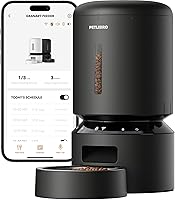
For an app-connected feeder, check its app and indicator lights for an alert. PETLIBRO says the Granary WiFi feeder can notify you about a jam, and its infrared sensor stops dispensing if the outlet is blocked.
An alert can help you spot a problem, but it doesn't clear the jam or confirm that the bowl contains food. Check the bowl yourself and provide a meal if the feeder hasn't dispensed.
If you feed two cats, the PETLIBRO WiFi feeder for two cats also provides clogging alerts and stops when its infrared sensor detects a blockage. Its stated food size range is 2–15 mm.
If clogs continue, compare the model's manual with our guide to choosing an automatic pet feeder. For a feeder that uses an app, our guide to WiFi cat feeders explains what app control can do.
When should you stop using a jammed feeder?
Stop relying on the feeder for meals if it jams repeatedly or won't dispense during a test. Set up another feeding method while you contact the manufacturer or arrange service.
Don't leave your cat depending on a feeder that has not passed a reliable test. If you can't resolve the blockage using the manual, ask the manufacturer for model-specific help.
For a different type of feeding problem, see our guide to SureFeed microchip feeder troubleshooting. Its steps apply to SureFeed microchip feeders, so use the manual for your own model.
How can you reduce the chance of another jam?
Use food the manual supports, keep the outlet clean, and test dispensing after cleaning or refilling. Regular checks can help you catch a blockage before a scheduled meal.
Keep the feeder on a stable surface and assemble the food container and base as directed. Avoid adding damp food to a dry-food feeder unless its instructions allow it.
If a clean feeder still jams with compatible food, stop testing it and contact the manufacturer. Choose a backup feeding plan until you know the feeder can dispense reliably.
Why is my automatic cat feeder jammed after cleaning?
A feeder may still jam after cleaning if food remains lodged near the outlet or a part isn't seated as directed. Unplug it again, remove the food, and check the outlet, base, and detector against the manual.
Let cleaned parts dry before refilling. If the rotor won't move during the manual's approved test, don't force it; contact the manufacturer before using the feeder for a scheduled meal.
Frequently asked questions
Why is my automatic cat feeder jammed?
Common causes include kibble lodged at the outlet, food that doesn't suit the feeder's opening, or a dirty detector or rotor. Unplug the feeder, empty it, and check the outlet and food path for loose pieces.
Follow the manual before removing parts or trying to turn the mechanism by hand.
How do I clear a jam in an automatic cat feeder?
Unplug the feeder, remove the food, and clear loose kibble from the outlet and food path. Clean the container, base, and detector as the manual allows, then refill and test a small manual portion.
Don't force the rotor or put fingers into a powered feeder.
Can kibble size cause an automatic feeder to jam?
Yes. Food that is too large or an unsuitable shape can get stuck at the outlet or rotor.
Check the feeder manual for its supported food size and type, and compare that guidance with your cat's kibble.
Don't assume every dry food will work with every feeder.
What should I do if my cat feeder keeps jamming?
Empty and clean the feeder, check the kibble against the manual, and test it with a small portion. If it jams again, stop relying on it for scheduled meals and contact the manufacturer for model-specific steps.
Arrange another way to feed your cat until the feeder works reliably.