How to Choose an Automatic Pet Feeder
Choose an automatic pet feeder by matching it to your pet’s food, portion routine and household setup. Then compare controls, monitoring, alerts, cleaning and backup power against the problems you need it to solve.
On this page (8 sections)
- What should you check before choosing an automatic pet feeder?
- Which controls fit your daily routine?
- Do you need separate feeding for multiple pets?
- Would a camera help you check meals?
- What alerts and backup features matter?
- How should you compare cleaning and food storage?
- Which automatic pet feeder fits each need?
- How do you choose the right feeder for your home?
Choose an automatic pet feeder by matching it to your pet’s food, portion routine and household setup. Then compare controls, monitoring, alerts, cleaning and backup power against the problems you need it to solve.
A feeder can dispense scheduled dry food, but it still needs refills, cleaning and checks. Start with the feeding job, then decide which extra features are useful.
If you want a basic overview of feeder types first, read our plain guide to automatic pet feeders.
What should you check before choosing an automatic pet feeder?
Choose a feeder that supports your pet’s food and fits the meal schedule you need. Food type and portion control come first because app features cannot help if the feeder does not suit the food or routine.
Write down the details of a normal day before comparing models:
- Food type and kibble size
- Number of meals and approximate portions
- Whether pets eat together or need separate diets
- How often someone can refill and clean the feeder
- Whether you need to check meals while away
Use your pet’s existing feeding plan as a reference. If portions or meal timing are part of a veterinary care plan, follow that plan when setting the feeder.
An automatic feeder supports a routine, but it cannot judge whether your pet needs a different meal. Monitor your pet’s appetite and ask your veterinarian about changes in feeding needs.
How to choose a pet automatic feeder for your food
Check that the feeder is made for the type of food you plan to use. The products in this guide describe dry food or kibble, so don’t assume they can dispense wet food.
Kibble size can also affect dispensing. For a larger kibble, check the stated size limit and keep an eye out for jams after setup.
If you switch food, check its shape and size against the feeder’s limits. A feeder’s capacity alone does not tell you whether a particular food will flow smoothly.
How much food capacity do you need?
Choose capacity based on how much food you want to store between refills, not on a promise that it will last a set number of days. Your pet’s portions and feeding schedule determine how quickly the container empties.
The products here range from a 3L storage container in the PETLIBRO RFID feeder to a 12L capacity in the Yakry dog feeder. The PETLIBRO Granary and camera models each have a 5L tank.
Think about where the feeder will sit and how often you can check it. A bigger container can reduce refill frequency, but it still needs regular attention.
Which controls fit your daily routine?
Choose manual scheduling if you set meals once and rarely change them. Choose app control when you want to adjust or check feeding from your phone.
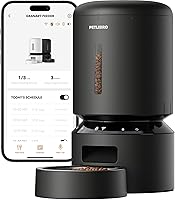
App features vary. The PETLIBRO Granary and camera feeder support schedules and remote feeding through their apps, while the Yakry model uses the Smart Life app for scheduling, portion changes and instant feeding.
Before relying on an app, consider who will set it up and check it. A complicated routine can be hard to maintain when several people share pet care.
For other app-controlled options, see is PETLIBRO good? and our best WiFi cat feeders.
Do you need separate feeding for multiple pets?
Choose an access-controlled feeder when pets need different food or portions. A shared open bowl can’t ensure that one pet eats only its own meal.
The PETLIBRO RFID feeder opens for a cat wearing its provided collar tag. It also supports diet tracking through the app, which may suit a home where food stealing or different diets are concerns.
The tag limitation matters: this model supports only its provided collar tag. Check whether your cat can wear it comfortably and whether the feeder’s approach fits your feeding setup.
For other multi-cat considerations, see our guide to automatic cat feeders for 2 cats.
Would a camera help you check meals?
Choose a camera feeder if seeing your pet and bowl during feeding matters to you. A camera adds a view of the meal, while a standard feeder focuses on dispensing food.
The PETLIBRO camera feeder offers 1080P video, night vision and two-way audio through its app. The Yakry dog feeder also includes a camera, night vision and two-way audio.
A camera can show whether your pet is near the bowl, but it cannot confirm every detail of a meal or respond if something goes wrong. If monitoring is your main goal, compare pet cameras and security cameras and learn how pet cameras work.
What alerts and backup features matter?
Choose alerts that tell you about problems you would otherwise miss. Low-food, jam and feeding notices can prompt a check, but they do not remove the need to inspect the feeder.
The PETLIBRO Granary describes alerts for low food, jams and other problems. Its infrared sensor stops dispensing if the outlet is blocked.
The PETLIBRO camera model also describes low-food and feeding notifications.
The RFID feeder includes backup battery power for feeding during internet or power outages. The Yakry feeder can use 3 D batteries as backup power, but those batteries are not included.
Check what an alert or backup covers before depending on it. Internet access, electricity and feeder function are separate parts of the setup.
How should you compare cleaning and food storage?
Choose a feeder with parts you can clean as often as your pet’s feeding area needs. A design that is hard to take apart can make routine cleaning less convenient.
The PETLIBRO Granary has a stainless steel bowl, a twist-lock lid and a desiccant bag compartment. The camera feeder describes a detachable design and a sealed 5L tank with a desiccant compartment.
Check which parts are removable and follow the care instructions for the model. Keep dry food storage clean and dry, and refill with food your pet already eats.
For a deeper look at common feeder issues, see why an automatic cat feeder gets jammed.
Which automatic pet feeder fits each need?
Choose the model whose stated features solve your main feeding problem. The Granary fits app scheduling, the RFID feeder fits controlled cat access, the Yakry fits a larger dog-feeding setup, and the PETLIBRO camera feeder fits scheduled feeding with video.
- PETLIBRO Granary 5L WiFi Automatic Feeder: app schedules, feeding records, a low-food sensor and a stainless steel bowl.
- PETLIBRO RFID Automatic Cat Feeder: tag-controlled access, app diet tracking and backup battery power.
- Yakry 12L Automatic Dog Feeder: larger stated capacity, app control and a camera with two-way audio.
- PETLIBRO Automatic Cat Feeder With Camera: scheduled feeding, 1080P video, night vision and two-way audio.
Compare each feature with your written checklist. If a model’s extra features do not solve a problem you have, a simpler setup may be easier to manage.
How do you choose the right feeder for your home?
Pick the feeder that matches your pet’s food, portion schedule and access needs. Add app control or a camera when you’ll use it, and treat alerts and backup power as support for regular checks.
For routine dog meals, start with food compatibility and portions; compare options in our large dog feeder guide. For time away, plan a person to check on your pet and use our guide to automatic feeders for travel as a comparison.
The right feeder can support a consistent meal routine. Your pet still needs someone to refill it, clean it and check that meals are being dispensed.
Frequently asked questions
How do I choose an automatic pet feeder?
Start with the food type and meal routine your pet already follows. Check that the feeder supports that food, offers suitable portion settings, and fits your home.
Add app control, a camera, or backup power only if those features solve a real need in your household.
Are automatic pet feeders suitable for dogs?
Some automatic feeders are designed for dogs, but size, kibble and meal needs matter. Check the feeder’s stated food limits and portion controls, especially for a large dog or larger kibble.
A timed feeder can help keep a routine, but it does not replace your care.
Should I choose a feeder with a camera?
A camera can help you check the bowl and see whether your pet approaches during meals. It adds monitoring, not care, so consider whether you need video or just reliable scheduled portions.
Read our guide to choosing a pet camera if you mainly need home monitoring.
Can one automatic feeder feed two pets?
A basic feeder may not keep pets from sharing food or taking each other’s portions. If your pets eat different diets or need separate portions, look for a design that controls access for each pet.
Feed them in separate spaces if the feeder cannot manage that distinction.
Can an automatic feeder replace a pet sitter?
No. A feeder can dispense scheduled dry food, but it cannot provide general care, notice every health change or respond to an emergency.
For longer absences, arrange for a person to check on your pet, replenish supplies and confirm the feeder is working.