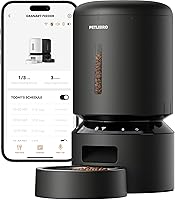
How to Set Up a PETLIBRO Automatic Cat Feeder
To set up a PETLIBRO automatic cat feeder, assemble the hopper and bowl, fill it with dry kibble in the 2–15mm range, and connect the power with batteries as backup. Then set meal times and portions in the app or control panel, and run a manual feed before leaving your cat alone with it.
On this page (7 sections)
- What should you check before you set up a PETLIBRO feeder?
- How do you assemble the feeder and fit the backup batteries?
- How do you fill the hopper and keep the food fresh?
- How do you set meal times and portions?
- How do you connect a WiFi PETLIBRO feeder to the app?
- How do you test the feeder before the first away day?
- How do you keep the feeder running well after setup?
To set up a PETLIBRO automatic cat feeder, assemble the hopper and bowl, fill it with dry kibble in the 2–15mm range, and connect the power with batteries as backup. Then set meal times and portions in the app or control panel, and run a manual feed before leaving your cat alone with it.
The whole job takes about 20 minutes on a counter near an outlet. The steps below follow the order that avoids the usual first-day problems: kibble jams, a feeder that forgets its schedule after a power blip, and portions that don't match your cat's daily food.
What should you check before you set up a PETLIBRO feeder?
Check the food, the power spot and the age of your cat first. PETLIBRO feeders are for dry food only, so a wet-food or mixed diet needs a different plan.
Start with kibble size. PETLIBRO says the feeder works with food 2–15mm across; anything outside that range can jam the rotor or slip through without being measured.
Pour a little of your cat's food onto a ruler to check.
Next, find a spot on a hard floor near an outlet, away from a wall the dispenser can bounce kibble against. Leave room above the hopper to lift the lid.
Finally, confirm your cat's age. PETLIBRO doesn't recommend these feeders for kittens under 3 months old, so keep hand-feeding very young kittens until they grow.
For the wider picture on when a feeder suits a cat, read are automatic feeders bad for cats.
How do you assemble the feeder and fit the backup batteries?
Lock the hopper onto the base, seat the bowl, then fit the backup batteries before plugging in. Assembly is tool-free on these models.
- Set the base on the floor and click the food tank into place.
- Slide the stainless bowl into its recess and check it sits flat.
- Open the battery compartment and fit 3 D-Cell batteries in the marked direction.
- Plug the USB-C adapter into the feeder and the wall.
The basic PETLIBRO Automatic Cat Feeder uses USB-C power plus 3 D-Cell batteries, which PETLIBRO says last about 30 to 50 days in backup. The WiFi models also keep their schedule when the adapter loses power, so fit batteries even if you never expect an outage.
Don't skip the desiccant bag. It sits in its holder under the lid and helps keep kibble crisp between refills.
Replace it on the schedule PETLIBRO gives rather than waiting for the food to go soft.
How do you fill the hopper and keep the food fresh?
Fill the tank no higher than the max line, close the twist-lock lid fully, and keep the desiccant fresh. A sealed lid and the rotor cover are what keep kibble dry and stop your cat scooping extra food out.
Pour dry food in with a scoop or jug so it doesn't spill into the lid seal. Close the lid until it twists past the stop; a half-closed lid lets damp air in and invites a curious paw.
The basic feeder holds enough for about 12 days for one cat, while the larger Granary 5L tank stretches further. Don't top up old food with new every day without emptying the tank now and then, because stale crumbs collect at the bottom.
The patent rotor and sealing strip sit under the tank. Leave them in place and wipe them during cleaning rather than pulling them out.
How do you set meal times and portions?
Set the clock, then build each meal: time, then portion count. On the basic feeder you do this on the control panel; on the Granary models you do it in the PETLIBRO app.
Work out your cat's daily food first. On the basic feeder one portion is about 2.5 teaspoons, while on the Granary WiFi models one portion is about 1/12 cup, roughly 20ml.
If your cat eats half a cup a day, divide that by the portion size of your model, then split the total across two or three meals.
The basic feeder allows up to 6 meals a day and 1–50 portions per meal. The Granary 5L and the 5G WiFi model each allow up to 10 meals a day and 1–48 portions per meal.
Spread meals evenly rather than stacking them at dawn.
Record the voice message last. On the basic feeder you record a 10-second call; the WiFi models let you store up to 10 messages and set when each one plays.
Use the same phrase you say at feeding time so your cat links the sound to food.
How do you connect a WiFi PETLIBRO feeder to the app?
Download the PETLIBRO app, create an account, and add the feeder on a 2.4GHz or 5GHz network. Both bands work on the Granary models, which matters if your router splits them into separate names.
- Put the feeder in pairing mode as the app instructs.
- Join your home WiFi from your phone and enter the password.
- Wait for the app to confirm the feeder is online.
- Set meals, portions and the voice call in the app.
- Check the feeding records after the first scheduled meal.
Keep the phone close to the feeder during pairing. If the app won't connect, switch the phone to the other WiFi band and try again, since dual-band models accept either.
Once connected, the app shows feeding logs and sends alerts when the tank is empty, the outlet jams or the battery runs low. Check those alerts during the first week so you catch a missed meal early.
How do you test the feeder before the first away day?
Run a manual feed and watch the bowl. This is the step that catches a jam, a wrong portion size or a misread clock while you're still home to fix it.
Press the manual feed button on the basic unit, or use the manual dispense button in the app on the WiFi models. Count the portions that land and compare them with what you set.
Then set one test meal a few minutes ahead and let the feeder run it on its own. Watch the rotor turn, listen for the voice call and check the bowl fills.
The infrared sensor stops dispensing if the outlet is blocked, so a test feed shows whether the food is flowing freely.
If nothing comes out, see why my automatic cat feeder is jammed for the checks in order. Most first-day jams come from kibble outside the 2–15mm range or a rotor that needs cleaning.
Which PETLIBRO feeder fits which setup?
The PETLIBRO Automatic Cat Feeder is the pick for a simple, reliable schedule without an app. Its 6 meals a day, 1–50 portions and USB-C plus battery backup cover most single-cat homes, and the voice call helps a cat adjust to eating alone.
The PETLIBRO Granary 5L WiFi Automatic Feeder suits homes that want app control and a bigger tank. The 5L hopper and up to 10 meals a day help multi-cat homes and kittens on frequent small servings, and the app sends alerts when food runs low or the outlet blocks.
The PETLIBRO 5G WiFi Feeder With Twist-Lock Lid is for buyers who want the dual-band app in a compact body. Tool-free assembly and a removable tank make the weekly clean quicker.
If you feed two cats, compare the options in our guide to the automatic cat feeder for 2 cats before you buy. The automatic pet feeder overview covers how these machines work for dogs as well as cats.
How do you keep the feeder running well after setup?
Clean the bowl and outlet weekly and refresh the desiccant on schedule. Most feeding problems start with crumbs or damp food rather than the electronics.
Lift out the stainless bowl and wash it by hand; the tank and rotor wipe clean with a damp cloth once the feeder is unplugged. Check the outlet detector for dust and kibble dust each time you refill.
Watch the portion count against your cat's weight over the first month. If your cat gains or loses weight, adjust portions rather than adding extra meals.
For the setup routine in one line: fill with dry food in the 2–15mm range, fit batteries, set meals and portions, then test a manual feed before you rely on the schedule.
Frequently asked questions
What food size works in a PETLIBRO automatic cat feeder?
PETLIBRO feeders take dry kibble roughly 2 to 15mm across. Smaller crumbs can slip past the rotor and larger pieces can jam the outlet, so check your cat's food against that range before filling the hopper.
How many meals can a PETLIBRO feeder dispense each day?
The basic PETLIBRO Automatic Cat Feeder runs up to 6 meals per day. The Granary WiFi models go up to 10 meals per day, which suits kittens on smaller, more frequent servings.
How much food is one portion in a PETLIBRO feeder?
On the basic PETLIBRO Automatic Cat Feeder one portion is about 2.5 teaspoons. On the Granary WiFi models one portion is about 1/12 cup, roughly 20ml.
You can set each meal from 1 to 48 or 50 portions depending on the model, so work out your cat's daily total first and divide it across the meals.
Does a PETLIBRO feeder keep working in a power cut?
Yes, when you fit the backup batteries. The basic feeder takes 3 D-Cell batteries that PETLIBRO says last about 30 to 50 days, and the WiFi models keep their schedule on battery backup too.
Can kittens under 3 months use a PETLIBRO automatic feeder?
PETLIBRO doesn't recommend its feeders for kittens under 3 months old. The portions and drop height suit older kittens, adult cats and small dogs, so hand-feed very young kittens until they are bigger.