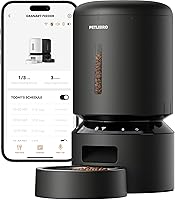
How to Reset a PETLIBRO Automatic Cat Feeder
To reset a PETLIBRO automatic cat feeder, clear any jam, unplug it for about 30 seconds, then power it back on. On Wi-Fi models, hold the reset or pairing button until the indicator changes, then re-add the feeder in the app and rebuild the meal schedule.
On this page (9 sections)
- What does a reset actually do on a PETLIBRO feeder?
- How do you reset a PETLIBRO automatic cat feeder step by step?
- How do you hard reset a Wi-Fi PETLIBRO feeder?
- Why does the feeder need a reset after a jam?
- When should you reset a feeder because of Wi-Fi problems?
- How do you set the schedule again after a reset?
- How do you know the reset worked?
- What should you do if a reset doesn't fix the problem?
- The short version on resetting your PETLIBRO feeder
To reset a PETLIBRO automatic cat feeder, clear the food outlet, cut the power for about 30 seconds, and restart it. On a Wi-Fi model, finish with a button reset and re-add the feeder in the app, then rebuild the meal plan so your cat stays on schedule.
A reset fixes most feeder faults: a stuck rotor, a red alert light, a lost Wi-Fi link or a schedule that stopped firing. The steps below walk through each case, from the safe power cycle to a full app re-pairing.
What does a reset actually do on a PETLIBRO feeder?
A reset clears the feeder's stuck state and, on Wi-Fi models, its network link. The basic timed models keep their stored schedule through a power cycle, while the Wi-Fi models need the app connection rebuilt.
The soft reset is just a power cycle: unplug the adapter, wait, plug it back in. The hard reset adds a press of the reset or pairing button and removes the feeder from the app, so you set it up fresh.
Most problems stop at the soft reset. Save the hard reset for when the app won't reconnect or the feeder ignores commands.
Either way, clear the outlet first so the restart happens with a clean path for food.
How do you reset a PETLIBRO automatic cat feeder step by step?
Clear the outlet, unplug, wait 30 seconds, restart, and test a portion. That order covers the basic feeder and the first stage of a Wi-Fi reset.
- Open the twist-lock lid and check the tank for clumps or empty space.
- Look into the food outlet and remove any kibble stuck in the rotor.
- Unplug the power adapter and remove the backup batteries.
- Wait about 30 seconds so the electronics fully drain.
- Replace the batteries, plug the adapter back in, and listen for the startup sound.
- Run a manual portion and watch the food drop into the bowl.
If the feeder dispenses cleanly, you're done. If the indicator still shows a red alert, wipe the outlet or sensor before trying again.
A power cycle alone won't fix a physical blockage, so the clear-out matters as much as the restart.
How do you hard reset a Wi-Fi PETLIBRO feeder?
Hold the reset or pairing button until the indicator changes, then remove the feeder in the app and add it again. This clears the saved network details so the feeder can join your Wi-Fi fresh.
The exact button varies by model, so find the small reset pinhole or button near the control panel. Use a paperclip or thin tool, press and hold, and watch the light for the reset blink.
In the PETLIBRO app, delete the old feeder from your device list. Go to the add-device screen and follow the pairing steps.
Your phone needs to be on the same 2.4GHz or 5GHz network the feeder will use.
Once the app confirms the connection, set your meal times and portions. The Granary models schedule up to 10 meals per day with 1 to 48 portions per meal.
If the feeder still won't connect, check the router band and move the feeder closer before another attempt. Our walkthrough of how to set up a PETLIBRO automatic cat feeder covers first-time pairing in more detail.
Why does the feeder need a reset after a jam?
A jam trips the infrared sensor, and the feeder stays paused until you clear the blockage and restart it. The sensor stops dispensing when something blocks the outlet, so the reset is what tells the feeder the path is clear.
The Wi-Fi models also send a phone notification and light the indicator red when food jams. That alert doesn't clear itself.
Open the outlet, pull out the packed kibble, and check the rotor turns freely.
Kibble size is the usual cause. Food outside the recommended size range can bridge across the outlet or slip past the rotor.
Fine crumbs and dust build up in the base over weeks and cause the same stop.
Wipe the outlet detector and rotor area before you power back on. Our guide to why my automatic cat feeder is jammed covers the common blockage patterns and how to prevent repeats.
When should you reset a feeder because of Wi-Fi problems?
Reset when the app shows the feeder offline or commands stop working. A dropped link leaves the feeder running its last stored schedule but deaf to new instructions.
Try the soft reset first: unplug, wait, and plug back in. Many routers and feeders reconnect on their own after a power cycle.
If the app still shows the feeder as offline, do the hard reset and pair it again.
Check the router before you blame the feeder. A 5GHz-only network can leave a 2.4GHz feeder without a connection, and the PETLIBRO app works on both bands so you can switch.
Move the feeder away from a metal cabinet or thick wall that weakens the signal.
If it stays offline after a reset and a band change, the Wi-Fi module may need support help. Don't keep resetting in a loop; one clean attempt with the password checked is enough.
Which PETLIBRO feeder is easiest to reset?
The {{product B09S8WMJY9 | A 5L Wi-Fi feeder with dual-band support and app notifications, so a reset and re-pairing go quickly.}} suits homes that want app control and a clear alert when something goes wrong.
The {{product B0BYD73PHN | A 5G Wi-Fi feeder with the same app control and a twist-lock lid that keeps kibble fresh.}} fits readers who want Wi-Fi features in a slightly different body.
The {{product B0953SDCRG | A basic timed feeder with no Wi-Fi, so a reset is just a power cycle and the schedule stays put.}} is the pick if you'd rather skip the app. For households feeding more than one cat, compare the best automatic cat feeder for 2 cats before choosing a model.
How do you set the schedule again after a reset?
Open the app or control panel, set each meal time and portion, and save before you walk away. On the Wi-Fi models the schedule lives in the app, so a full reset means rebuilding it there.
Set meals in the order your cat expects them. Morning and evening feeds are the common pattern, but the Granary models allow up to 10 meals a day, so smaller, more frequent portions are an option.
Check the portion size against your cat's daily intake. A portion on the Granary Wi-Fi models is 1/12 cup, and the basic feeder measures 2.5 teaspoons per portion.
Counting portions is easier than guessing bowl depth.
After saving, run a manual dispense to confirm the feeder responds. Watch the app log to see the feeding record appear.
If the schedule fires at the wrong time, check the time zone setting in the app before changing the meals.
How do you know the reset worked?
The feeder dispenses a test portion, the indicator light returns to normal, and the app shows the feeder as online. Those three signs together mean the reset took.
Listen for the motor during a manual feed. A clean drop with no grinding means the rotor and outlet are clear.
A red light that stays on after a restart points back to the outlet sensor or a low battery.
Check the app's feeding log for the test portion. A missing entry means the app isn't talking to the feeder.
Re-pair it once more before assuming a hardware fault.
Replace the backup batteries if the low-battery alert returns. The basic feeder's D-cell backup lasts about 30 to 50 days, so a reset that keeps draining them points to old cells rather than a feeder fault.
What should you do if a reset doesn't fix the problem?
If two resets and a clean outlet don't restore feeding, the feeder needs service or replacement. Repeated failures after a full power cycle and re-pairing usually mean a part has failed.
Before you give up, run the basic checks in order: dry food only, outlet wiped, rotor turning, adapter connected, batteries fresh. A feeder that beeps but doesn't drop food often has a blocked outlet rather than a dead motor.
Track when the fault happens. A stop at the same meal time each day suggests a schedule or time zone error.
A stop after a few portions suggests a jam building in the outlet.
If the unit is still under warranty, contact PETLIBRO support with the model number and the steps you tried. A feeder that keeps failing is also a reason to look at how these units fit a cat's routine, which our post on whether automatic feeders are bad for cats covers.
The short version on resetting your PETLIBRO feeder
For anyone learning how to reset a PETLIBRO automatic cat feeder, the reliable order is clear, power cycle, re-pair, rebuild the schedule. Start with the soft reset, because it fixes most jams and glitches without losing your meal plan.
Go to the hard reset only when the app won't reconnect or commands fail after a power cycle. Then set the meals again and confirm with a test portion before you rely on the feeder for a full day.
Keep the outlet and rotor clean and use kibble in the recommended size range. Those two habits prevent most of the resets you would otherwise need.
If you're still shopping, our PETLIBRO setup guide and the 2-cat feeder comparison help you pick one that fits your household.
Frequently asked questions
How do I reset my PETLIBRO automatic cat feeder?
Clear any food blocking the outlet, unplug the feeder for about 30 seconds and plug it back in. On Wi-Fi models, press and hold the reset or pairing button, then add the feeder in the app again and set your meal times and portions.
Does resetting a PETLIBRO feeder erase my meal schedule?
A full Wi-Fi reset usually clears the feeder from the app, so you'll set meals and portions again. A simple power cycle keeps the stored schedule on the timed models.
Rebuild the plan before you walk away, and run a test portion first.
Why does my PETLIBRO feeder keep saying food is jammed?
Kibble that is too large or too small, a blocked outlet or a dusty rotor can trigger the jam alert. Use dry food within the recommended size range, clear the outlet, and wipe the base and rotor before you reset.
Do I need to remove the batteries when resetting a PETLIBRO feeder?
Unplug the adapter and remove the backup batteries for a full power cycle, then put the batteries back and reconnect the adapter. This clears a stuck state and gives the feeder a clean restart without leaving the backup drained.