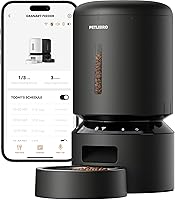
How to Program an Automatic Pet Feeder
To program an automatic pet feeder, connect it to 2.4GHz or 5GHz WiFi, then set meal times and portions in the brand's app and save the schedule. Power the unit from the wall adapter with batteries as backup, then run a manual feed to confirm the portion size before relying on it.
On this page (9 sections)
- What do you need before you program a feeder?
- How do you connect an automatic feeder to WiFi?
- How do you set meal times and portions in the app?
- How do you set the clock and check the time zone?
- How do you test a feed and adjust the portion?
- How do you keep the schedule running when WiFi or power drops?
- How do you set a meal call and feeding alerts?
- How do you program a two-cat feeder so both cats get fed?
- Which feeder fits your household?
To program an automatic pet feeder, connect it to WiFi, set each meal time and portion count in the brand's app, and save the schedule. Power the feeder from the wall adapter with batteries as backup, then run a manual feed into a measuring cup to check the portion size before you rely on it.
The steps below walk through programming a PETLIBRO WiFi feeder from the first setup to a schedule you trust. The same order works for most app-controlled feeders, so you can follow along whatever model you own.
What do you need before you program a feeder?
You need a 2.4GHz or 5GHz WiFi network, a phone with the feeder's app, dry food that fits the feeder, and the original power adapter. Set these up near the feeder before you start, not while you're halfway through the settings.
The PETLIBRO feeders in this guide connect over both 2.4GHz and 5GHz WiFi. That matters because many smart home devices only accept the 2.4GHz band, and a dual-band feeder gives you more options for where it sits.
Have your WiFi password ready, since you'll type it during pairing. Keep the feeder near the router for the first setup, then move it once the connection holds.
Finally, fill the hopper with the dry food your pet already eats. The schedule means nothing if the food doesn't dispense cleanly.
For the wider picture on how these machines fit daily life, our automatic pet feeder guide covers the main types and what each one does.
How do you connect an automatic feeder to WiFi?
Download the brand's app, create an account, and pair the feeder through the app's add-device flow. PETLIBRO asks for registration and login so the feeder gets its own name in a multi-pet household and feeding records stay tied to your account.
Plug the feeder into the wall adapter before pairing. The unit needs power to broadcast its setup signal, and batteries alone aren't the way to start.
In the app, choose the add-a-feeder option and follow the prompts. The app asks for your WiFi name and password, then waits while the feeder joins the network.
Keep the phone close to the feeder and the feeder close to the router during this step.
Once the app confirms the connection, give the feeder a clear name. If you own more than one, "Kitchen feeder" and "Bedroom feeder" save confusion later when you check feeding records.
A failed pairing usually means a wrong password or a weak signal, so retry near the router before you change anything else.
How do you set meal times and portions in the app?
Open the feeding plan, add each meal time, choose the portion count for that meal, and save. This is the core of how to program an automatic pet feeder, and it takes a few minutes once the app is connected.
Portion size is the part people get wrong. The 5L PETLIBRO feeders measure 1/12 cup per portion, so a meal of 1/4 cup is 3 portions.
Work out your pet's daily amount first, then split it across the meals you want to serve.
Meal times should suit your household, not the feeder's convenience. Two meals a day is common, and four smaller meals work well for cats that eat fast.
Space them evenly so your pet isn't waiting a long stretch between feeds.
Save the plan, then read it back in the app. The feeding records only start once the plan is active.
How do you set the clock and check the time zone?
Set the feeder's clock in the app, or let it sync from your phone, and confirm the time zone is correct. A feeder running an hour off will serve breakfast at the wrong time, and the mistake is easy to miss.
Most app feeders pull the time from the phone, so the schedule you build matches the time on your screen. Check the app's feeder settings for a time zone field, especially if you travel or live near a zone border.
If the model has a display, compare the time on the unit with your phone. A mismatch means the sync failed, and reconnecting to WiFi usually fixes it.
Do this before the first scheduled meal so you aren't guessing why the bowl stayed empty.
How do you test a feed and adjust the portion?
Use the app's manual feed button to dispense one portion into a measuring cup, then adjust your meals from what you see. Testing is the only way to know how much food actually lands in the bowl.
Press the manual feed once and wait. The feeder dispenses a set number of portions, and the food should land in the bowl without piling up or scattering.
If the amount looks off, change the portion count in the schedule rather than the manual feed.
Repeat with your planned meal size. A 1/4 cup meal should measure close to 1/4 cup, allowing for how the kibble settles.
Adjust in single portions until the scoop looks right, then update every meal to match.
Do this test with your pet out of the room. A pet that learns the manual feed button means food will start begging at the feeder, and the point of the schedule is that meals arrive without a performance.
How do you keep the schedule running when WiFi or power drops?
The saved schedule lives on the feeder, so a WiFi outage doesn't cancel meals already set. Power is the bigger risk, and batteries are what carry the feeder through an outage.
The PETLIBRO 5L feeders support external power with battery backup. Use the original power adapter and fit batteries as a backup, then change them on a regular schedule so the backup is actually there when the power goes out.
The app sends a notification when the battery is low, along with alerts for an empty tank, a jam or a blocked outlet. Read those alerts promptly, since a low battery or an empty hopper is how a programmed schedule quietly fails.
Keep the WiFi signal steady by leaving the feeder within range of the router. If the app shows the feeder offline, the meals you already set still run, but you can't change them remotely until the connection returns.
How do you set a meal call and feeding alerts?
Record a voice message in the app and pick which meals it plays for. The PETLIBRO app stores up to 10 meal calls and lets you set the volume, so the same clip can play at breakfast and stay quiet at night.
Record the call in a quiet room and keep it short. Say your pet's name and a simple cue, then save it and attach it to the meals you choose.
Play one back at the feeder to check the volume before the first scheduled feed.
Turn on phone notifications for the feeder as well. The 5L models alert you when the tank is empty, food jams, the battery runs low or the outlet is blocked.
Those alerts are what tell you a programmed meal didn't happen.
How do you program a two-cat feeder so both cats get fed?
Use the double food tray mode and choose an even number of portions so the split is equal. The PETLIBRO 5L feeder for 2 cats sends dry food to two stainless steel bowls to cut down on food guarding.
The split needs a little planning. Set the app to double tray mode in cup units and pick an even number of portions for each meal, with at least 2/12 cup per batch.
Then adjust the meal splitter so the food lands evenly in both bowls.
Watch the first few feeds to see whether one cat pushes the other away. If one cat finishes first and moves to the second bowl, feed in separate rooms or adjust the split until both get their share.
Which feeder fits your household?
Pick the 5L PETLIBRO Granary for most homes, the 3L model for small pets or tight spaces, and the two-cat feeder for a pair that eats together. Each one programs the same way in the app, so the choice comes down to capacity and bowls.
The Granary 5L is the strongest all-rounder, with the largest hopper alongside the two-cat feeder (both 5L) and the fullest set of app controls. The 3L model suits a single small cat or a smaller dog and takes up less floor space.
The two-bowl model earns its place in a two-cat home where separate bowls matter more than hopper size.
Our guide to choosing a pet automatic feeder goes deeper on capacity and bowl count. If you'll be away, compare automatic pet feeders for travel before you commit.
And if two bowls is the deciding factor, the automatic pet feeder 2 bowls picks put the options side by side.
Once the plan is saved, check the feeding records for the first week. If the portions look right and the meals land on time, how you program an automatic pet feeder is settled: leave the schedule alone and let the machine do the work.
Frequently asked questions
How many meals can an automatic feeder serve per day?
The PETLIBRO WiFi feeders in this guide schedule up to 10 meals per day. The Granary 5L adjusts from 1 to 48 portions per meal at 1/12 cup per portion, and the two-cat 5L feeder goes up to 50 portions.
Do I need WiFi to program an automatic feeder?
For the app-controlled models here, yes: you pair the feeder to 2.4GHz or 5GHz WiFi and set the schedule in the PETLIBRO App. The schedule stays on the feeder afterward, so a later WiFi drop won't cancel meals already set.
What happens to the schedule during a power cut?
Batteries keep the feeder running when the wall adapter loses power. Use the original adapter and change the batteries regularly so backup power is there when you need it.
How do I change a feeder's portions after setting a schedule?
Open the meal in the app, change the portion count, and save. Run a manual feed into a measuring cup to see how much one portion really is before you adjust the whole plan.
Can two people set the schedule from their own phones?
The two-cat PETLIBRO feeder supports multiple users, so more than one person can set feeding times and view feeding records. Each person signs in to the app on their own phone.
How should I move a pet onto a programmed feeder?
Set the feeder to the meal size your pet already eats and keep the same meal times for the first week. Watch the bowl at each feed and adjust portions gradually rather than changing several settings at once.