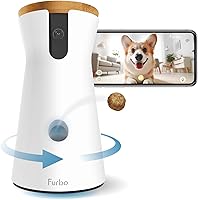
Furbo Subscription: What Works With and Without It
You don't need a Furbo subscription for basic live viewing, two-way audio, treat tossing, or noise alerts. Furbo Nanny adds features such as AI alerts and video history, with a 14-day trial for new users.
On this page (7 sections)
- What does a Furbo subscription add?
- What works on a Furbo camera without a subscription?
- What happens when the 14-day Furbo Nanny trial ends?
- Do you need Furbo Nanny for alerts?
- Which Furbo camera fits your needs without a subscription?
- Does adding another Furbo camera require a subscription?
- Is a Furbo subscription worth it?
You can use a Furbo camera without a subscription for basic live view, two-way audio, treat tossing, and barking or meowing alerts. Furbo Nanny adds advanced features such as AI-powered alerts, video history, daily reports, Nanny Chat, and Calm My Pet.
New users can try Furbo Nanny free for 14 days. After the trial, you can subscribe to keep those features or continue using the camera's included basic functions.
What does a Furbo subscription add?
Furbo Nanny adds advanced alerts and other features beyond the camera's basic tools. The three cameras covered here include a 14-day trial for new users.
Furbo Nanny features named for the trial include AI-powered alerts, video history, daily reports, Nanny Chat, and Calm My Pet. Those features are not included after the trial ends unless you subscribe.
A subscription may matter if you want alerts that go beyond basic barking or meowing notifications, or if you want video history. If live check-ins and simple alerts meet your needs, the included features may be enough.
For a wider overview of camera features and how live monitoring works, read how pet cameras work.
What works on a Furbo camera without a subscription?
Basic live viewing, two-way audio, treat tossing, and sound alerts work without a paid plan on the Furbo models below. The specific alert depends on the camera: the Dog Camera detects barking, while the Cat Camera detects meowing.
The Furbo Mini 360 includes 2K QHD live view, 360° rotation, barking and meowing alerts, two-way audio, color night vision, and treat tossing. Its basic functions remain available without a subscription after the trial.
The Mini's treat dispenser holds up to 10 bite-sized treats measuring 0.25–0.5 in. That smaller capacity can suit occasional rewards, but check your treat size before relying on it.
The Furbo 360 Dog Camera provides 1080p live view, 360° rotation, barking alerts, two-way audio, color night vision, and treat tossing without a subscription. Its basic camera functions are a fit if you want to check in and offer a treat without paying for advanced alerts.
The Furbo 360 Cat Camera includes the same basic set with meowing alerts and a detachable feather wand toy. For a broader camera comparison, see what a pet camera is and whether you need one.
What happens when the 14-day Furbo Nanny trial ends?
The advanced Furbo Nanny features stop being included after the 14-day trial. You can subscribe to keep them or continue with each camera's basic features at no ongoing cost.
This is a useful choice to make before starting the trial. Decide whether you need saved video and advanced alerts, or whether real-time viewing and basic noise notifications answer your main question: what's happening with your pet right now?
Don't assume that every alert or feature available during the trial stays active afterward. Furbo describes AI-powered alerts and video history as Nanny features, while basic barking or meowing alerts are included with the cameras.
Does Furbo save video without a subscription?
Video history is a Furbo Nanny feature, so plan on needing a subscription for that feature after the trial. Basic live view is for watching in real time and does not mean you can replay past footage.
If you want to review events after they happen, video history may be a reason to keep Furbo Nanny. If you only need to open the app and look in on your pet, the basic live view may suit you.
Do you need Furbo Nanny for alerts?
You don't need Furbo Nanny for basic barking or meowing alerts on these cameras. The Dog Camera includes barking alerts, the Cat Camera includes meowing alerts, and the Mini 360 includes both.
Furbo Nanny adds AI-powered alerts, which are separate from those basic sound notifications. Think about the difference between a notification tied to a specific noise and advanced alerts that are part of the subscription.
A camera alert can help you notice activity, but it doesn't replace checking on your pet or arranging care. For planning time away, see how long a cat can be left alone at home.
Which Furbo camera fits your needs without a subscription?
Choose by pet, alert type, and treat use; the basic features don't require Furbo Nanny. The Mini 360 covers both barking and meowing, while the other two models are named for dogs and cats.
Pick the Furbo Mini 360 if you want 2K QHD live view and a compact treat dispenser that holds up to 10 small treats. Its small treat size limit matters if your pet's usual treats are larger.
Pick the Furbo 360 Dog Camera if barking alerts and treat tossing for a dog are the main needs. It includes 1080p live view, 360° rotation, two-way audio, and night vision without a subscription.
Pick the Furbo 360 Cat Camera if you want meowing alerts and the included feather wand toy along with basic live view and treat tossing. It also offers two-way audio, night vision, and 360° rotation.
If you are comparing other camera brands and their plans, read what Petcube includes without a subscription. You can also compare Furbo's computer viewing options in how to watch Furbo on a computer.
Does adding another Furbo camera require a subscription?
Adding multiple cameras to an account that already uses Furbo Nanny may require a paid plan or upgrade. Furbo's camera information says existing Nanny users need a paid plan to add cameras, though the exact plan details can depend on the account.
If you plan to cover more than one room, check the current account requirements before choosing a setup. One camera may be enough if it can cover the area where your pet spends time.
Is a Furbo subscription worth it?
A Furbo subscription is most useful if you want Nanny features such as AI-powered alerts or video history. If you only need live view, two-way audio, treat tossing, and basic barking or meowing alerts, the included features may be enough.
Choose the Mini 360 for its higher-resolution live view and small treat dispenser, the Dog Camera for dog-focused barking alerts, or the Cat Camera for meowing alerts and its feather wand. Try the included 14-day Furbo Nanny trial only if you want to see whether its advanced features help your routine.
Frequently asked questions
Can you use a Furbo camera without a subscription?
Yes. The Furbo Mini 360, 360 Dog Camera, and 360 Cat Camera include basic live view, two-way audio, treat tossing, and barking or meowing alerts without a paid subscription.
Furbo Nanny adds advanced features, and new users can try it free for 14 days before deciding whether to subscribe.
What happens when a Furbo Nanny trial ends?
When the 14-day trial ends, Furbo Nanny features such as AI-powered alerts, video history, daily reports, Nanny Chat, and Calm My Pet are no longer included. You can subscribe to keep those features or continue with the camera's basic features at no ongoing cost.
Does Furbo save video without a subscription?
Video history is a Furbo Nanny feature, so don't assume you can replay past footage without a subscription. Basic live viewing lets you check the camera in real time, while a paid plan is needed for the advanced history feature after the trial ends.
Do you need a subscription to use multiple Furbo cameras?
Furbo says adding multiple cameras to an account that already uses Furbo Nanny requires a paid plan or an upgrade. The exact account plan can affect what you can add, so check Furbo's current support guidance if you plan to use more than one camera.