7 Best Indoor Cameras for Watching Pets (October 2026)
The best indoor pet cameras include the eufy Indoor Cam S350 Dual-Lens 4K Camera for wide and close views, the Furbo Mini 360 Camera (No Ongoing Cost) for treat tossing, and the eufy Indoor Cam E30 4K for smart home compatibility.
On this page (5 sections)
The best indoor camera for pets for most homes is the eufy Indoor Cam S350, because it pairs a wide room view with a telephoto view for closer detail. Pick Furbo Mini 360 if tossing small treats matters, or PETLIBRO if you want activity organized by pet.
An indoor camera can help you check whether your cat is resting or your dog is moving around while you’re away. Think about the room, your Wi-Fi band, whether you want saved video, and which features need a subscription before choosing.
For a basic overview, see how pet cameras work. If you’re still comparing camera types, our guide to choosing a pet camera covers placement and features.
Our picks at a glance
-
1
 Best for wide and close views
eufy Indoor Cam S350 Dual-Lens 4K Camera
8.9/10 our score
See it on Amazon -
2

-
3

- 4
 Check it
eufy Indoor Cam E220 Pan and Tilt
Best for 2K value - 5
 Check it
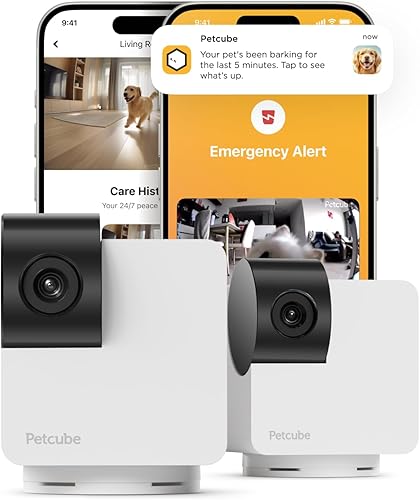
Petcube Cam 360 Pan-Tilt Camera (2-Pack)
Best for covering two rooms - 6
 Check it
Anona 4K Pan-Tilt Indoor Pet Camera
Best for dual-band Wi-Fi - 7
 Best for multi-pet activity summariesCheck it
How we chose indoor cameras for pets
We compared the stated video, movement coverage, audio, storage, Wi-Fi and subscription features against common home monitoring needs. Our score weighs specs, features and buyer feedback against what you’re shopping for.
The picks cover several priorities: keeping a moving pet in view, talking through the camera, checking a second room, and reviewing activity later. The best fit depends on what you need to see and whether you want recordings or just a live view.
| Product | Best for | Video | Coverage | Storage | Our score |
|---|---|---|---|---|---|
| eufy Indoor Cam S350 Dual-Lens 4K Camera | wide and close views | 4K wide-angle and 2K telephoto | 360° pan, tilt and zoom | microSD card or HomeBase S380 | 8.9 |
| Furbo Mini 360 Camera (No Ongoing Cost) | treat tossing | 2K QHD | 360° rotating view | 8.7 | |
| eufy Indoor Cam E30 4K | smart home compatibility | 4K | 360° panoramic view | Local SD card, sold separately | 8.6 |
| eufy Indoor Cam E220 Pan and Tilt | 2K value | Up to 2K, or 1080p with HomeKit | 360° pan and tilt | 7.8 | |
| Petcube Cam 360 Pan-Tilt Camera (2-Pack) | covering two rooms | 1080p HD | 360° pan and tilt | 7.7 | |
| Anona 4K Pan-Tilt Indoor Pet Camera | dual-band Wi-Fi | 4K UHD | 360° pan and 110° tilt | 7.6 | |
| PETLIBRO Cat and Dog Camera | multi-pet activity summaries | 1080p HD | 360° pan and tilt | 7.5 |
Which indoor pet camera fits your home?
The S350 is the strongest fit when you want two views at once, while Furbo Mini adds treat tossing and PETLIBRO focuses on multiple pets. The other cameras suit specific needs such as smart home support, 2-pack coverage or dual-band Wi-Fi.
eufy Indoor Cam S350 Dual-Lens 4K Camera: Best for wide and close views
- 4K wide-angle and 2K telephoto lenses
- 8× hybrid zoom
- 360° coverage and auto tracking
- Local microSD storage
Dual lenses show a room view and a closer view together, while auto tracking follows moving pets. Local storage is available with a separate microSD card.
Pros
- Wide and telephoto views together
- Auto tracking and preset points
- Local storage without a monthly fee
Cons
- microSD card is sold separately
- HomeKit is not supported
The S350’s dual-lens design is its main distinction: the 4K wide-angle and 2K telephoto cameras work together to show a room view and close-up detail at once. Its 8× hybrid zoom can help you check a pet bed or another preset spot without losing the wider view.
The camera offers 360° coverage, auto tracking for moving pets, and custom points of interest. You can set the camera to cycle through preset areas, which may help when a pet moves between a bed, food area and doorway.
It records locally to a separate microSD card or HomeBase S380, so there’s no monthly fee for local storage. HomeKit is not supported, and it works with HomeBase 3 only when the listed firmware requirement is met.
Choose the S350 if room coverage and close-up detail are both important. If you’d rather toss a treat during a check-in, Furbo Mini 360 offers that feature with its basic camera functions.
Furbo Mini 360 Camera (No Ongoing Cost): Best for treat tossing
- 2K QHD live view
- 360° rotation and auto tracking
- Two-way audio
- Treat tossing for up to 10 small treats
The compact Furbo pairs a rotating view and two-way audio with a small treat dispenser. Its basic live view and treat tossing do not require a subscription.
Pros
- Core camera features work without a subscription
- Barking and meowing alerts
- Treat tossing holds up to 10 small treats
Cons
- USB power adapter is not included
- Advanced AI alerts and video history require Furbo Nanny
Furbo Mini 360 combines live video, two-way audio and treat tossing in a compact camera that rotates through a 360° view. The treat holder fits up to 10 bite-sized treats between 0.25 and 0.5 in, so larger treats won’t fit.
Its core features, including live view, barking or meowing alerts, auto tracking and treat tossing, work without a subscription. Furbo Nanny adds advanced AI alerts and video history, but those are not part of the ongoing no-cost features.
Setup needs the Furbo app and a 2.4 GHz Wi-Fi network. The included cable has no power adapter, so plan to use a compatible USB adapter.
Pick Furbo if you want a way to speak to your pet or toss a small treat from the app. For a closer look at subscription features, read our Furbo subscription guide.
eufy Indoor Cam E30 4K: Best for smart home compatibility
- 4K recording
- 360° panoramic view and auto tracking
- Two-way audio
- HomeKit, Alexa and Google Assistant support
The E30 combines 4K recording and auto tracking with HomeKit, Alexa and Google Assistant support. HomeKit resolution is limited to 1080p.
Pros
- 4K recording
- Local SD card storage without monthly fees
- Works with three named smart home systems
Cons
- SD card is sold separately
- Uses 2.4 GHz Wi-Fi
The eufy E30 suits homes where 4K recording and smart home compatibility matter. It supports HomeKit, Alexa and Google Assistant, though HomeKit video resolution is limited to 1080p.
Its panoramic view and auto tracking follow detected people or pets. The built-in spotlight can support color night vision, and two-way audio lets you communicate through the camera.
Local recording uses a separate SD card, and the camera’s core functions do not require a monthly fee. The E30 uses 2.4 GHz Wi-Fi, so check your network before you buy.
Choose it if you want a 4K camera that works with your preferred smart home system. For a comparison of two eufy models, see E30 vs S350 for watching pets.
eufy Indoor Cam E220 Pan and Tilt: Best for 2K value
- Up to 2K video
- 360° pan and tilt with tracking
- Human or pet event detection
- Two-way audio
The E220 offers a pan-and-tilt view with pet detection and tracking. It supports several voice assistant systems, with video resolution limited to 1080p when using HomeKit.
Pros
- Pet and human event detection
- Automatic tracking
- HomeKit, Google Assistant and Alexa support
Cons
- Does not support 5 GHz Wi-Fi
- HomeKit use lowers resolution to 1080p
The E220 is a practical choice for 2K pan-and-tilt monitoring with pet and human event detection. It tracks moving objects and provides 360° coverage, while two-way audio lets you speak through the camera.
It works with HomeKit, Google Assistant and Alexa. HomeKit limits resolution to 1080p, and the camera requires a 2.4 GHz Wi-Fi network.
Choose it if you want tracking and smart home support without needing the E30’s 4K recording. It’s a straightforward option for checking a pet in one room from your phone.
Petcube Cam 360 Pan-Tilt Camera (2-Pack): Best for covering two rooms
- Two cameras in the pack
- 1080p HD video
- Pan-tilt view and 8× zoom
- Physical privacy mode
The two-camera pack can cover separate rooms, with 1080p live video, night vision and two-way audio. Live streaming works without a subscription.
Pros
- Two cameras in one pack
- Physical lens cover for privacy
- Live streaming works without a subscription
Cons
- Smart alerts and video history require Petcube Care
- Uses 2.4 GHz Wi-Fi
This Petcube set includes two cameras, making it a fit for checking separate rooms. Each Cam 360 offers 1080p live video, pan and tilt, 8× zoom, night vision and two-way audio.
Live streaming works without a subscription. Petcube Care adds smart alerts, video history and activity summaries, so check those plan features if recorded events are part of your reason for buying.
The camera has a physical privacy mode that blocks the lens, and it connects to 2.4 GHz Wi-Fi. Choose this pair if two-room coverage matters more than 4K video.
Anona 4K Pan-Tilt Indoor Pet Camera: Best for dual-band Wi-Fi
- 4K UHD video and 8× zoom
- 360° pan and 110° tilt
- Person, pet and crying detection
- 2.4 GHz and 5 GHz Wi-Fi
Anona pairs 4K video and auto tracking with dual-band Wi-Fi support. Local recording is available with a separate microSD card.
Pros
- Supports both 2.4 GHz and 5 GHz Wi-Fi
- Local storage supports microSD cards up to 512 GB
- Detects people, pets and crying
Cons
- microSD card is sold separately
- This product name covers a 2-pack
Anona’s camera combines 4K video, 8× zoom and dual-band Wi-Fi. It supports both 2.4 GHz and 5 GHz networks, which gives you a choice if your indoor camera location has a stronger connection on one band.
It can pan 360° and tilt 110°, with auto tracking and detection for people, pets and baby crying. Local storage supports a separate microSD card up to 512 GB, while cloud storage is another option.
This product name covers a 2-pack. Choose it if you want two cameras and need 5 GHz support, but compare the storage and app needs with the eufy E30 first.
PETLIBRO Cat and Dog Camera: Best for multi-pet activity summaries
- Recognizes up to 5 pets
- 360° auto pet tracking
- Individual activity timelines
- 1080p video and two-way audio
PETLIBRO organizes activity by pet, including events such as eating, drinking and motion. Cloud storage and smart AI features are optional subscription services.
Pros
- Can recognize up to 5 pets
- Sorts events into individual timelines
- Includes two-way audio and a privacy cover
Cons
- No SD card support
- Recognition may mislabel pets that look very similar
PETLIBRO is the pick for organizing activity across a multi-pet home. It can recognize up to 5 pets and group events such as motion, eating, drinking and selfies into individual timelines.
The camera offers 1080p video, 360° auto tracking, color night vision and two-way audio. It has a privacy cover, but does not support SD cards; automatic video history and smart AI features use optional cloud storage.
PETLIBRO notes that pets with very similar appearances may be mislabeled. Choose it if separating activity by pet is useful, and review the app’s storage options before you rely on saved footage.
What should you check before choosing a pet camera?
Match the camera to the space and the way you plan to check in. A rotating camera can follow a moving pet, but placement, Wi-Fi and storage still affect how useful it is.
Does a wide or rotating view matter more?
A rotating camera can cover more of one room than a fixed view, while dual lenses can show both the room and a close-up. The S350 is the only pick here that combines a wide and telephoto view on one screen.
Measure shelf or wall placement and consider where your pet spends time. A camera aimed too low or blocked by furniture may miss the areas you care about, even when it can pan or tilt.
Do you want live view or saved video?
Live view lets you check in at the moment, while saved footage helps you review what happened earlier. Some cameras offer local storage through a separate card, while others make video history a paid service.
The S350, E30 and Anona support local microSD recording, with cards sold separately. Furbo and Petcube offer basic live use without ongoing fees, while advanced Furbo features and Petcube history or smart alerts require subscriptions.
Which Wi-Fi band does your camera need?
Check the camera’s Wi-Fi requirements against the network where you plan to install it. Furbo Mini, E30, E220 and Petcube use 2.4 GHz; Anona supports both 2.4 GHz and 5 GHz.
A camera that uses only one band may need a compatible network setting during setup. If your router combines bands under one network name, check the camera maker’s setup instructions.
What features do you actually need?
Two-way audio helps you speak through the camera, and treat tossing adds a way to reward or engage a pet remotely. These features are useful only if you expect to use them and can place the camera safely.
For a simple live check, a general indoor camera may be enough. Our pet camera vs security camera comparison explains the differences in pet-focused features.
How do pet camera subscriptions work?
A camera can provide live video without a paid plan, while features such as cloud history, AI alerts or daily summaries may require a subscription. Check the exact features included at setup and after any trial ends.
Furbo Mini includes live view, two-way audio, treat tossing and basic barking or meowing alerts without an ongoing subscription. Furbo Nanny adds advanced features such as AI alerts and video history.
Petcube’s basic live streaming also works without a subscription. Petcube Care adds alerts, video history and summaries, while its AI Vet chat and live vet access are described as Premium plan features.
Which indoor camera for pets should you pick?
Choose the eufy S350 if you want wide and close views at the same time, Furbo Mini if you want treat tossing, or PETLIBRO if you want activity organized by pet. For two rooms, consider the Petcube pair; for HomeKit and 4K recording, consider the E30.
If you’re deciding whether a camera is enough for time away, read how long a cat can be left alone at home. A camera can help you check in, but it does not feed a pet or replace someone who can respond in person.
FAQ
Is an indoor security camera good for watching pets?
Yes, an indoor security camera can show a live view of your pet, and some models add pan-and-tilt coverage, tracking and two-way audio. Pet-focused cameras may also offer treat tossing or activity summaries.\n\nCheck whether the features you need work without a subscription and whether the camera fits your Wi-Fi network.
Do pet cameras need a subscription?
No, some cameras provide core features such as live view without a subscription. Others charge for extras such as saved video, smart alerts or summaries.\n\nFor example, Furbo Mini’s basic camera features work without an ongoing fee, while Furbo Nanny adds advanced features.
Check what remains available after any trial ends.
Can a pet camera work without Wi-Fi?
The cameras in this roundup use Wi-Fi to connect to their apps, so remote live viewing depends on a working network connection. Some support local storage, which can save footage to a card, but that does not provide remote access by itself.\n\nCheck the camera’s network band requirements before setup.
Where should you place an indoor camera for pets?
Place the camera where it can see the areas your pet uses most, such as a bed or open part of the room. Keep the lens clear of furniture and position cords where pets can’t chew or pull them.\n\nFor a rotating model, leave room for its view to move without hitting an object.
Our top 3 picks at a glance
-
1
Best for wide and close views
eufy Indoor Cam S350 Dual-Lens 4K Camera
8.9/10 our score
See it on Amazon -
2
-
3


